Group sheriff receipts into a bank deposit so collected funds can be reconciled to the bank.
## At a glance
- **Identify it by:** **Deposit Date**, **Receipt Start Date**, and **Receipt End Date**.
- **Check its business context:** **Bank Account**, **Source Account**, and **Cash Drawer**.
- **Why care:** Use the agency’s approved terminology and access policy. Preserve dates, responsible personnel, case links, and audit history because these records may support official reporting or custody review.
## Before you begin
You need the Brisk permission for the action you are taking on sheriff bank deposits. If a Create, Edit, or Delete control is absent, do not work around it with another user’s account; ask an administrator to review your role.
Have valid **Bank Account** records ready first. Those selections determine where this Sheriff Bank Deposit belongs and which later screens can find it.
Create a Sheriff Bank Deposit
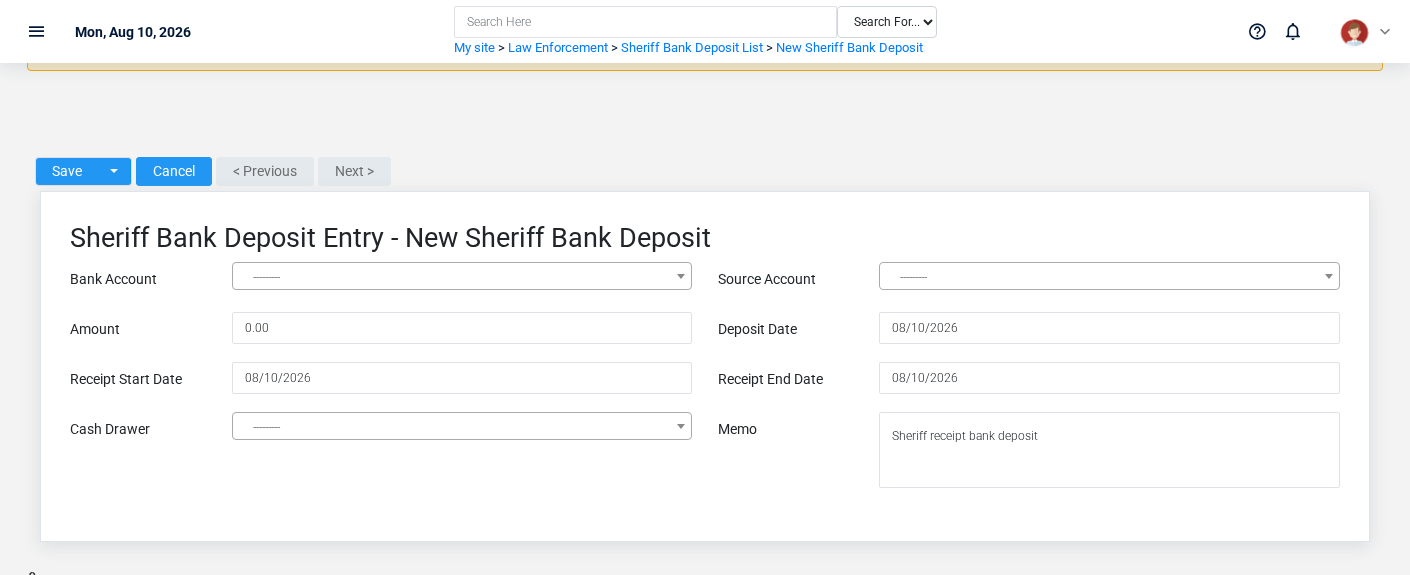
The Sheriff Bank Deposits create screen in the Brisk documentation demo.
Create a Sheriff Bank Deposit only after confirming that the source document or operational event has not already been entered.
1. Select the business context first: **Bank Account**, **Source Account**, and **Cash Drawer**.
2. Enter the required identifying and operational values: **Bank Account**, and **Amount**.
3. Review **Deposit Date**, **Receipt Start Date**, **Receipt End Date**, and **Memo** against the source document or approved setup decision.
4. Save the Sheriff Bank Deposit, then confirm **Deposit Date**, **Receipt Start Date**, and **Receipt End Date** on its detail page before continuing.
After saving: Verify **Bank Account**, **Source Account**, and **Cash Drawer** on the detail page, then continue the law enforcement workflow only when those values agree with the source document and actual work performed.
Delete a Sheriff Bank Deposit
Delete this Sheriff Bank Deposit only when it was entered by mistake and no downstream history depends on it. Use a reversal, void, credit, counter-adjustment, or status correction for a real event that later changed.
On the confirmation page, verify **Deposit Date**, **Receipt Start Date**, and **Receipt End Date**. After confirmation, return to the Sheriff Bank Deposits list and make sure only the intended Sheriff Bank Deposit was removed.
Review Sheriff Bank Deposit details
Use the detail page as the shared record of what this Sheriff Bank Deposit currently means. Verify **Amount**, **Deposit Date**, **Receipt Start Date**, and **Receipt End Date** before relying on it for a decision.
Follow **Bank Account**, **Source Account**, and **Cash Drawer** to determine whether the issue is on this Sheriff Bank Deposit or on one of those linked records.
Next check: Verify **Bank Account**, **Source Account**, and **Cash Drawer** on the detail page, then continue the law enforcement workflow only when those values agree with the source document and actual work performed.
Edit an existing Sheriff Bank Deposit
Edit this Sheriff Bank Deposit to correct or complete the same source document or operational event; use the supported reversal or follow-up workflow when the business event itself changed.
1. Open the detail page. Compare **Bank Account**, **Source Account**, and **Cash Drawer** with the supporting document or approved request.
2. Recheck **Bank Account**, **Source Account**, **Amount**, **Deposit Date**, **Receipt Start Date**, and **Receipt End Date**. These values are most likely to change case history, custody, dispatch, official reporting, or audit review.
3. Save the change, return to the list, and confirm that the Sheriff Bank Deposit now appears under the expected **Deposit Date**, **Receipt Start Date**, and **Receipt End Date**.
After the change: Verify **Bank Account**, **Source Account**, and **Cash Drawer** on the detail page, then continue the law enforcement workflow only when those values agree with the source document and actual work performed.
Find and review sheriff bank deposits
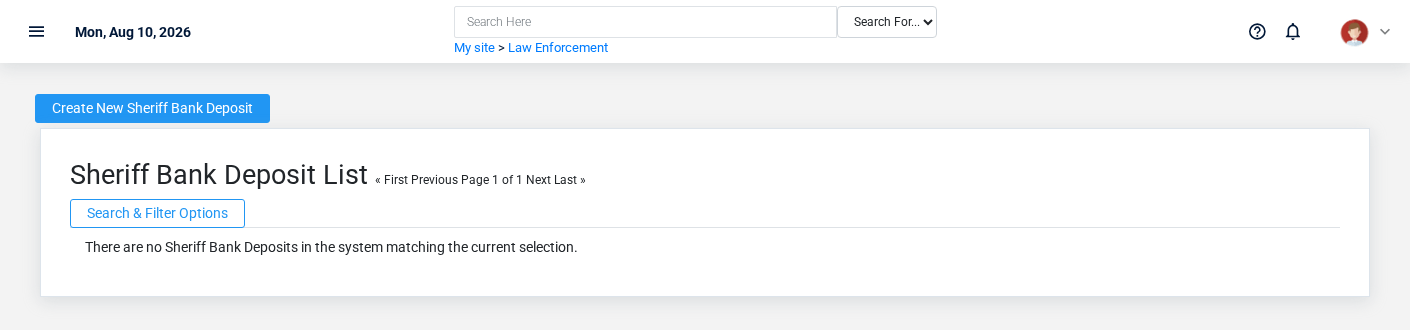
The Sheriff Bank Deposits list screen in the Brisk documentation demo.
Use the Sheriff Bank Deposits list to find the correct record before opening or changing it. Compare **Deposit Date**, **Receipt Start Date**, and **Receipt End Date**. Records with similar names or numbers can still belong to different **Bank Account**, **Source Account**, and **Cash Drawer**.
- Narrow the list with **Bank Account**, and **Cash Drawer** filters.
- The date filter uses **Deposit Date**; choose a range that matches the business event you are reconciling.
Open the Sheriff Bank Deposit whose **Deposit Date**, **Receipt Start Date**, and **Receipt End Date** match the task. If it is missing, clear the list filters and recheck **Bank Account**, **Cash Drawer**, and **Deposit Date** rather than creating a replacement immediately.
## Fields and business rules
Brisk stores 8 user-relevant fields for this Sheriff Bank Deposit, including 3 linked-record selections and 0 controlled-choice fields. Create and edit screens may hide calculated or workflow-managed values from this full reference.
| Field | Required | What it controls |
|---|---:|---|
| **Bank Account** | Yes | The bank account associated with this sheriff bank deposit. |
| **Source Account** | No | The source account associated with this sheriff bank deposit. |
| **Amount** | Yes | The amount value recorded for this sheriff bank deposit. |
| **Deposit Date** | No | Date recorded for deposit date on this sheriff bank deposit. |
| **Receipt Start Date** | No | Date recorded for receipt start date on this sheriff bank deposit. |
| **Receipt End Date** | No | Date recorded for receipt end date on this sheriff bank deposit. |
| **Cash Drawer** | No | The cash drawer associated with this sheriff bank deposit. |
| **Memo** | No | The memo recorded for this sheriff bank deposit. |
## What happens next
Verify **Bank Account**, **Source Account**, and **Cash Drawer** on the detail page, then continue the law enforcement workflow only when those values agree with the source document and actual work performed.
## Common mistakes and troubleshooting
- **The record will not save:** Recheck **Bank Account**, and **Amount** and any message beside the field. A required related record may also be inactive or unavailable to your role.
- **The values look right but the result is wrong:** Open **Bank Account**, **Source Account**, and **Cash Drawer** from the detail page. Correct the specific relationship that is wrong instead of forcing a total or status to compensate for it.