Define an item assembly or formula, its inputs, quantities, outputs, and instructions for repeatable production.
## At a glance
- **Identify it by:** **Manufactured Item**, **Manufactured Quantity**, **Manufactured Uom**, and **Ingredient Total**.
- **Check its business context:** **Manufactured Item**, **Manufactured Uom**, **Ingredient Uom**, **Container**, and **Type**.
- **Why care:** Confirm item, formula, unit, warehouse, quantity, and production state together; mistakes can distort both material consumption and finished-goods cost.
## Before you begin
You need the Brisk permission for the action you are taking on item assemblies. If a Create, Edit, or Delete control is absent, do not work around it with another user’s account; ask an administrator to review your role.
Have valid **Manufactured Item**, and **Manufactured Uom** records ready first. Those selections determine where this Item Assembly belongs and which later screens can find it.
Find and review item assemblies
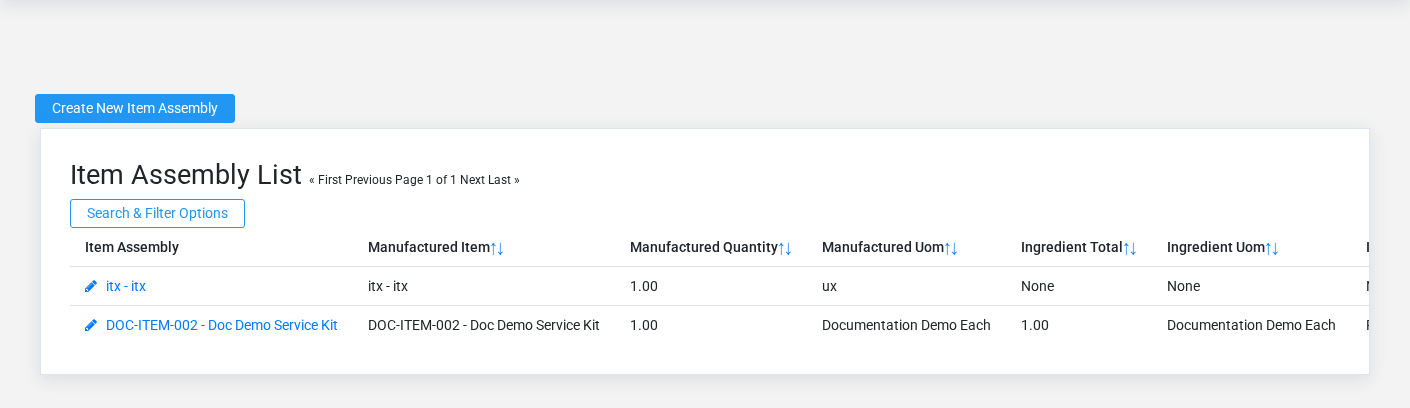
The Item Assemblies list screen in the Brisk documentation demo.
Use the Item Assemblies list to find the correct record before opening or changing it. Compare **Manufactured Item**, **Manufactured Quantity**, **Manufactured Uom**, and **Ingredient Total**. Records with similar names or numbers can still belong to different **Manufactured Item**, **Manufactured Uom**, **Ingredient Uom**, **Container**, **Type**, and **Mixer**.
Open the Item Assembly whose **Manufactured Item**, **Manufactured Quantity**, **Manufactured Uom**, and **Ingredient Total** match the task. If it is missing, clear the list filters and recheck the identifying information shown on the screen rather than creating a replacement immediately.
Create an Item Assembly
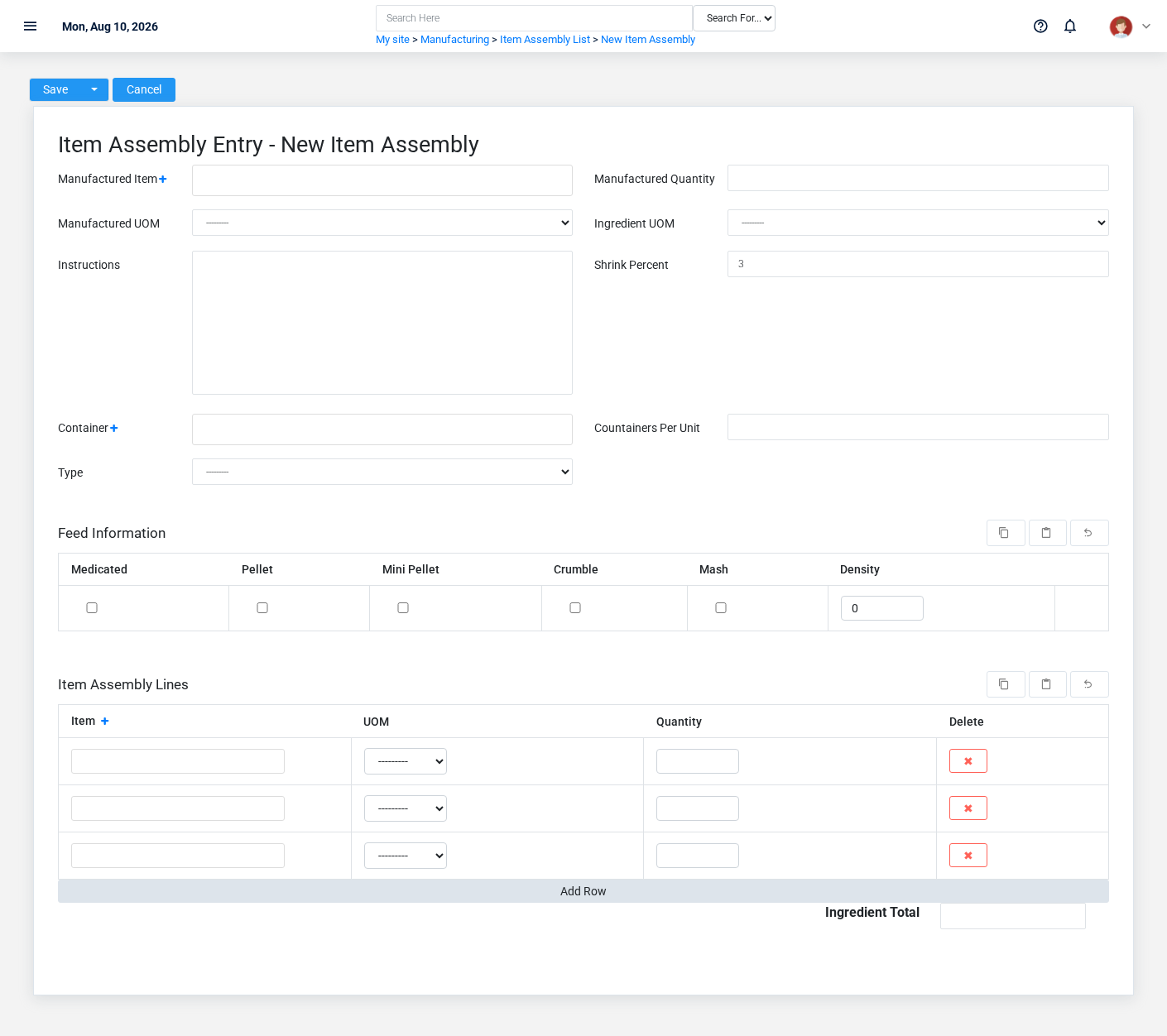
The Item Assemblies create screen in the Brisk documentation demo.
Create an Item Assembly after searching for the person, organization, item, location, or resource under alternate names and identifiers. Merge or correct an existing master record instead of creating a duplicate.
1. Select the business context first: **Manufactured Item**, **Manufactured Uom**, **Ingredient Uom**, **Container**, **Type**, and **Mixer**.
2. Enter the required identifying and operational values: **Manufactured Item**, **Manufactured Quantity**, and **Manufactured Uom**.
3. Review **Auto Manufacture** deliberately; these choices control availability or workflow rather than merely describing the record.
4. Save the Item Assembly, then confirm **Manufactured Item**, **Manufactured Quantity**, **Manufactured Uom**, **Ingredient Total**, **Ingredient Uom**, and **Instructions**, plus the remaining screen fields on its detail page before continuing.
After saving: Verify this Item Assembly in **Feed Information**, **Formula Import Records**, **Item Assembly Lines**, and **Manual Production Inputs**, plus the remaining screen fields before staff build new activity on it; correct ownership, classification, and active state now rather than after transactions accumulate.
Delete an Item Assembly
Delete this Item Assembly only if it is an unused duplicate or setup mistake. Once other records refer to it, preserve that history and make the value inactive when the screen provides that option.
Before confirming, check for related **Feed Information**, **Formula Import Records**, **Item Assembly Lines**, **Manufacturing Instances**, and **Manual Production Inputs**. Brisk may refuse deletion when another record depends on this one; resolve the duplicate or use the supported correction workflow instead of breaking the trail.
On the confirmation page, verify **Manufactured Item**, **Manufactured Quantity**, **Manufactured Uom**, and **Ingredient Total**. After confirmation, return to the Item Assemblies list and make sure only the intended Item Assembly was removed.
Review Item Assembly details
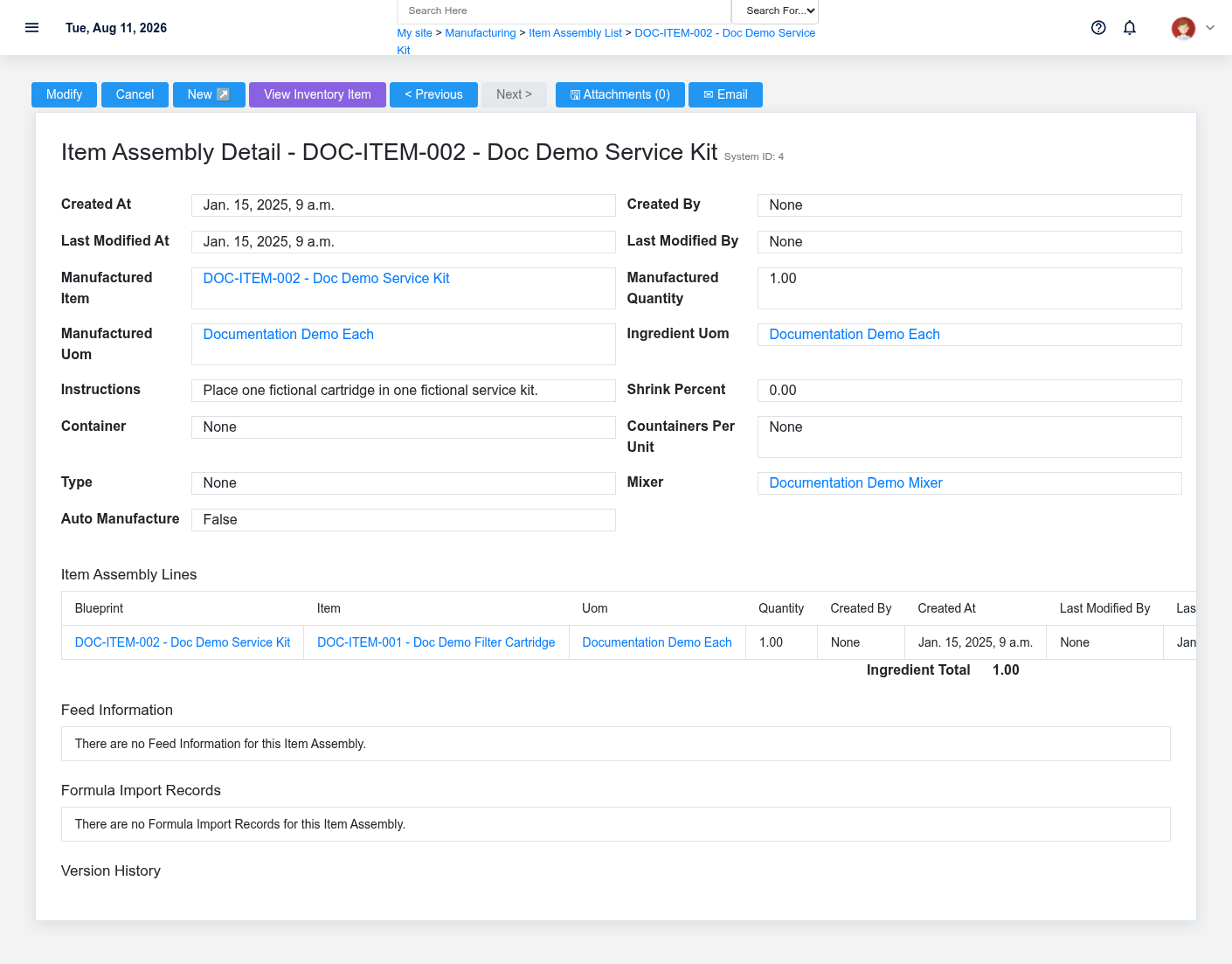
The Item Assemblies detail screen in the Brisk documentation demo.
Use the detail page as the shared record of what this Item Assembly currently means. Verify **Ingredient Total** before relying on it for a decision.
Follow **Manufactured Item**, **Manufactured Uom**, **Ingredient Uom**, **Container**, **Type**, and **Mixer** to determine whether the issue is on this Item Assembly or on one of those linked records.
Next check: Verify this Item Assembly in **Feed Information**, **Formula Import Records**, **Item Assembly Lines**, and **Manual Production Inputs**, plus the remaining screen fields before staff build new activity on it; correct ownership, classification, and active state now rather than after transactions accumulate.
Edit an existing Item Assembly
Edit this Item Assembly to keep the same real-world party, item, location, or resource accurate. Do not repurpose it for a different entity after activity is attached.
1. Open the detail page. Compare **Manufactured Item**, **Manufactured Uom**, **Ingredient Uom**, **Container**, **Type**, and **Mixer** with the supporting document or approved request.
2. Recheck **Manufactured Quantity**, and **Ingredient Total**. These values are most likely to change material demand, production status, output quantity, and cost.
3. Save the change, return to the list, and confirm that the Item Assembly now appears under the expected the identifying information shown on the screen.
After the change: Verify this Item Assembly in **Feed Information**, **Formula Import Records**, **Item Assembly Lines**, and **Manual Production Inputs**, plus the remaining screen fields before staff build new activity on it; correct ownership, classification, and active state now rather than after transactions accumulate.
## Fields and business rules
Brisk stores 12 user-relevant fields for this Item Assembly, including 6 linked-record selections and 0 controlled-choice fields. Create and edit screens may hide calculated or workflow-managed values from this full reference.
| Field | Required | What it controls |
|---|---:|---|
| **Manufactured Item** | Yes | The manufactured item recorded for this blueprint. |
| **Manufactured Quantity** | Yes | The manufactured quantity value recorded for this blueprint. |
| **Manufactured Uom** | Yes | The manufactured uom associated with this blueprint. |
| **Ingredient Total** | No | The ingredient total value recorded for this blueprint. |
| **Ingredient Uom** | No | The ingredient uom associated with this blueprint. |
| **Instructions** | No | The instructions recorded for this blueprint. |
| **Shrink Percent** | No | Shrink acts as a padding to the reported cost of the finished good without affecting the inventory or general ledger. Shrink is meant to fiscally account for loss of ingredients during the manufacturing process by encouraging slightly higher markups. |
| **Container** | No | Optionally sets the container used for this formula (e.g. bags, boxes, crates). |
| **Countainers Per Unit** | No | Sets the number of containers used for each "Manufactured UOM" produced. For example, if the Manufactured UOM is Ton, and the container is a 50 Pound Bag, this field would have a value of 40. |
| **Type** | No | Sets the type of blueprint. |
| **Mixer** | No | Optionally sets the mixer used by this blueprint. If left blank, this blueprint will use the system Default Mixer preference instead. |
| **Auto Manufacture** | No | If this field is checked, Brisk will attempt to create and relieve a manufacturing batch on this product any time it is sold. WARNING: Brisk Software Systems cannot guarantee the accuracy of your inventory if this is enabled. |
## What happens next
Verify this Item Assembly in **Feed Information**, **Formula Import Records**, **Item Assembly Lines**, and **Manual Production Inputs**, plus the remaining screen fields before staff build new activity on it; correct ownership, classification, and active state now rather than after transactions accumulate.
## Common mistakes and troubleshooting
- **The record will not save:** Recheck **Manufactured Item**, **Manufactured Quantity**, and **Manufactured Uom** and any message beside the field. A required related record may also be inactive or unavailable to your role.
- **The values look right but the result is wrong:** Open **Manufactured Item**, **Manufactured Uom**, **Ingredient Uom**, **Container**, **Type**, and **Mixer** from the detail page. Correct the specific relationship that is wrong instead of forcing a total or status to compensate for it.