
Purchase to Pay
Purchase to Pay
Outcome and roles
This workflow follows an inventory purchase from an approved order through a partial receipt, vendor invoice, and allocated payment. Vendor, warehouse, item, quantity, cost, receipt, obligation, and payment evidence remain connected so purchasing, receiving, and accounting can review the vendor'ssame bill,chain without re-entering it.
Demonstration scenario
Demonstration notice: Every vendor, item, identifier, amount, bank reference, and
payment.transaction is fictional. Documentation fixtures persist safe states without sending purchase orders, issuing payments, or contacting external systems.
Workflow at a glance
| Outcome | Received inventory, supported vendor obligation, and traceable payment application |
| Starts with | Reviewed vendor, item, warehouse, and purchase need |
| Ends with | Payment allocation plus any visible remaining amount |
| Primary roles | Buyer, receiving clerk, accounts-payable clerk |
| Brisk areas involved | Vendors, Purchase Orders, Receiving, Vendor Invoices, Payments |
| Common businesses | Retail, feed/supply, parts, equipment, wholesale |
| Approximate handoffs | Three |
Why this workflow matters
Purchasing staff needknow validwhat vendors,was items,ordered, costs,receiving knows what arrived, and aaccounting destinationsees warehouse. Receiving staff needwhat the deliveredvendor quantitiesbilled. Keeping those records linked makes partial delivery, cost, freight, invoice, and freightpayment information.differences Accountingvisible staffrather needthan theburying vendor'sthem in a single payable total.
Each status marks a real control point. A submitted order is not a receipt, a receipt is not a verified vendor invoice, expense or asset allocation, terms, and an authorizedallocated partial payment account.does not make the invoice fully paid.
Before you begin
TheRequired:vendorvalidmustVendor,haveitems,theunits,payabledestination warehouse, payable/fee accounts, terms, andfee accounts required by its setup.permissions.InventoryRequireditems and the receiving warehouse must exist.Payment terms should reflect the vendor agreement.Ifwhen receipt freight isentered, Brisk requires theentered: Receiving Freight Accrual Account preference.Keep external payment processors disabled in documentation demo environments.
1. Create and submit the purchase order
Create a Purchase Order with vendor, warehouse, dates, and item rows. Purchase status begins as Draft. Review quantities, unit costs, freight, and total before submission because later receiving uses the order rows and copies freight information.
2. Receive the inventory
Convert the purchase order into an Inventory Receipt, then record the quantity receivedRequired for each order row. The code supports partial receipt tracking by comparing receipt quantities with ordered rows. When deferred costing is enabled, final-cost processingprocessing: also requiressupported vendor and vendor invoice number;reference.
freight
End-to-end steps
- Buyer — verify vendor and need. Confirm vendor, warehouse, requested dates, item, unit, quantity, cost, freight, and total. If the need came from Restock, first review Automatic Restock to Replenished Inventory.
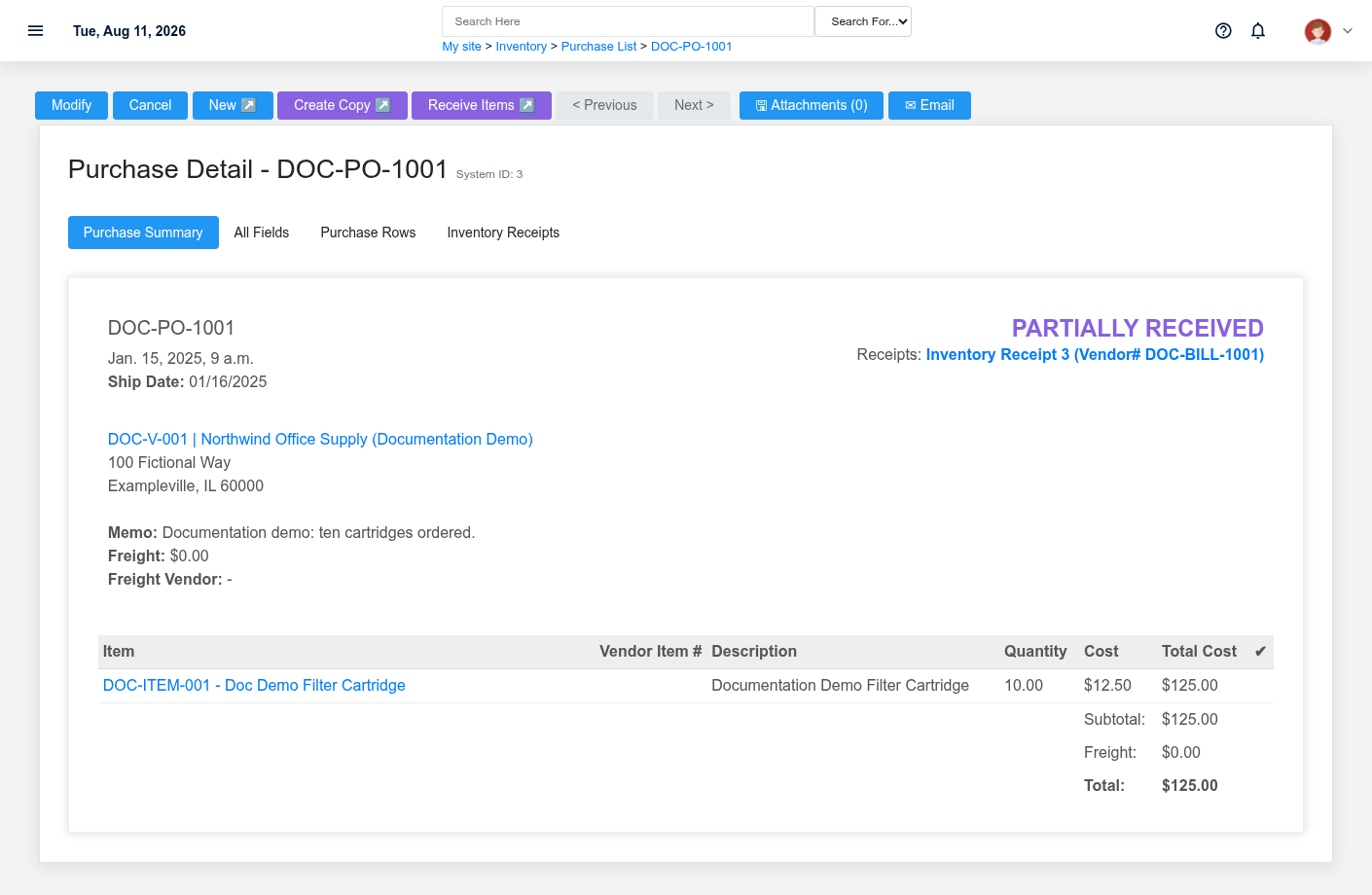
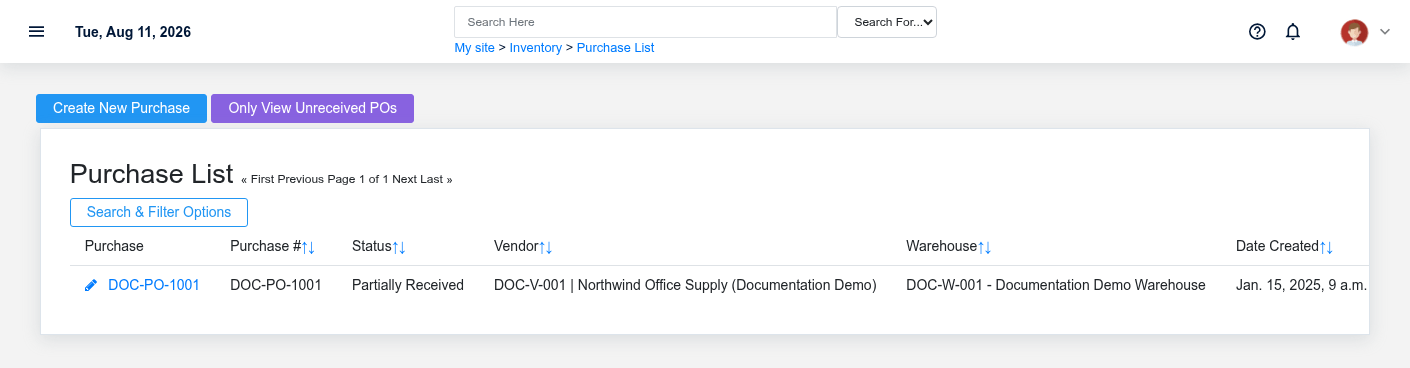
- Buyer — create and submit the Purchase Order. Create Purchase Order DOC-PO-1001. It begins Draft. Review rows before the supported submission action; submission alone does not prove a vendor received a message.
Receiving checkpoint
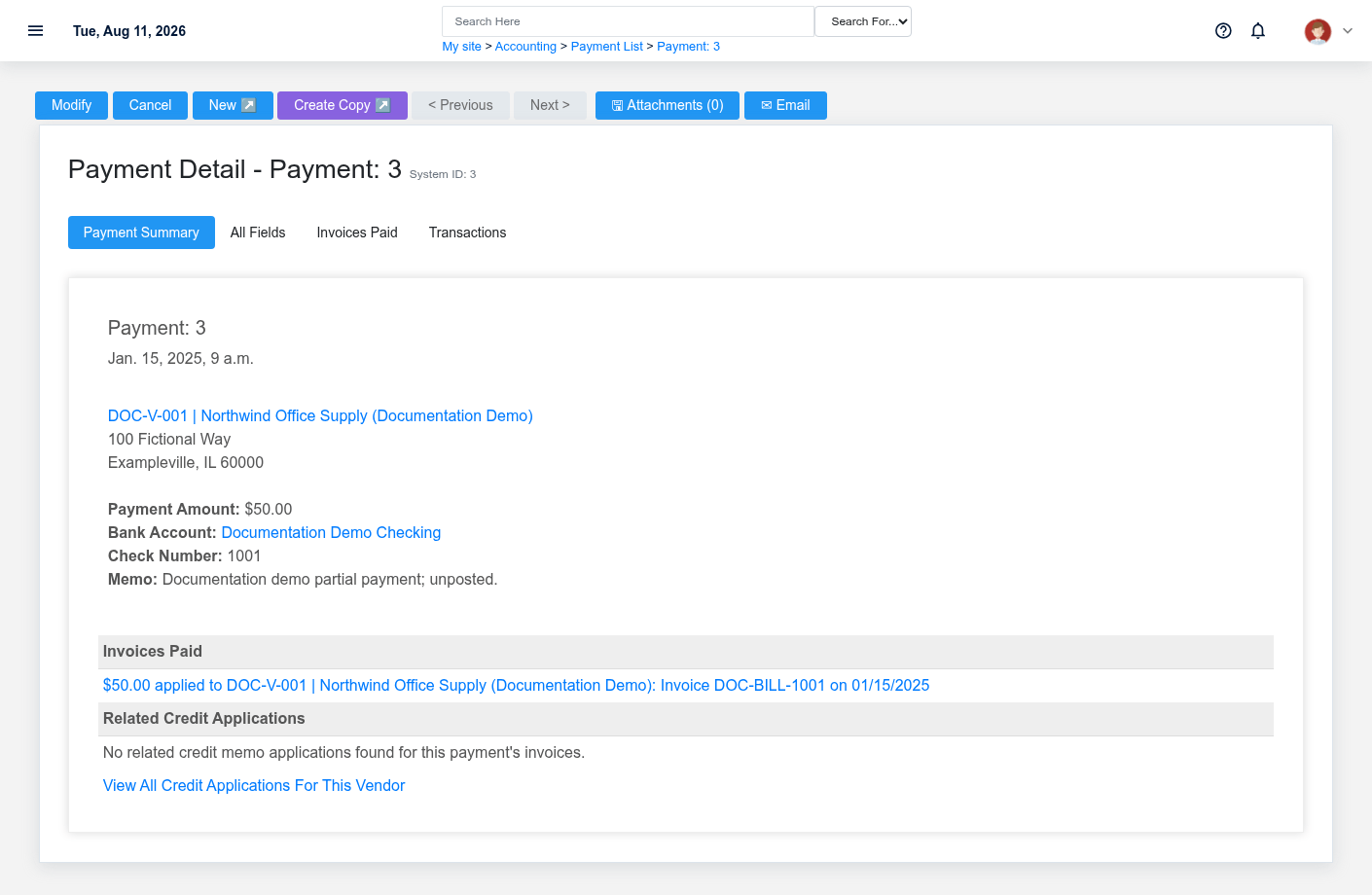
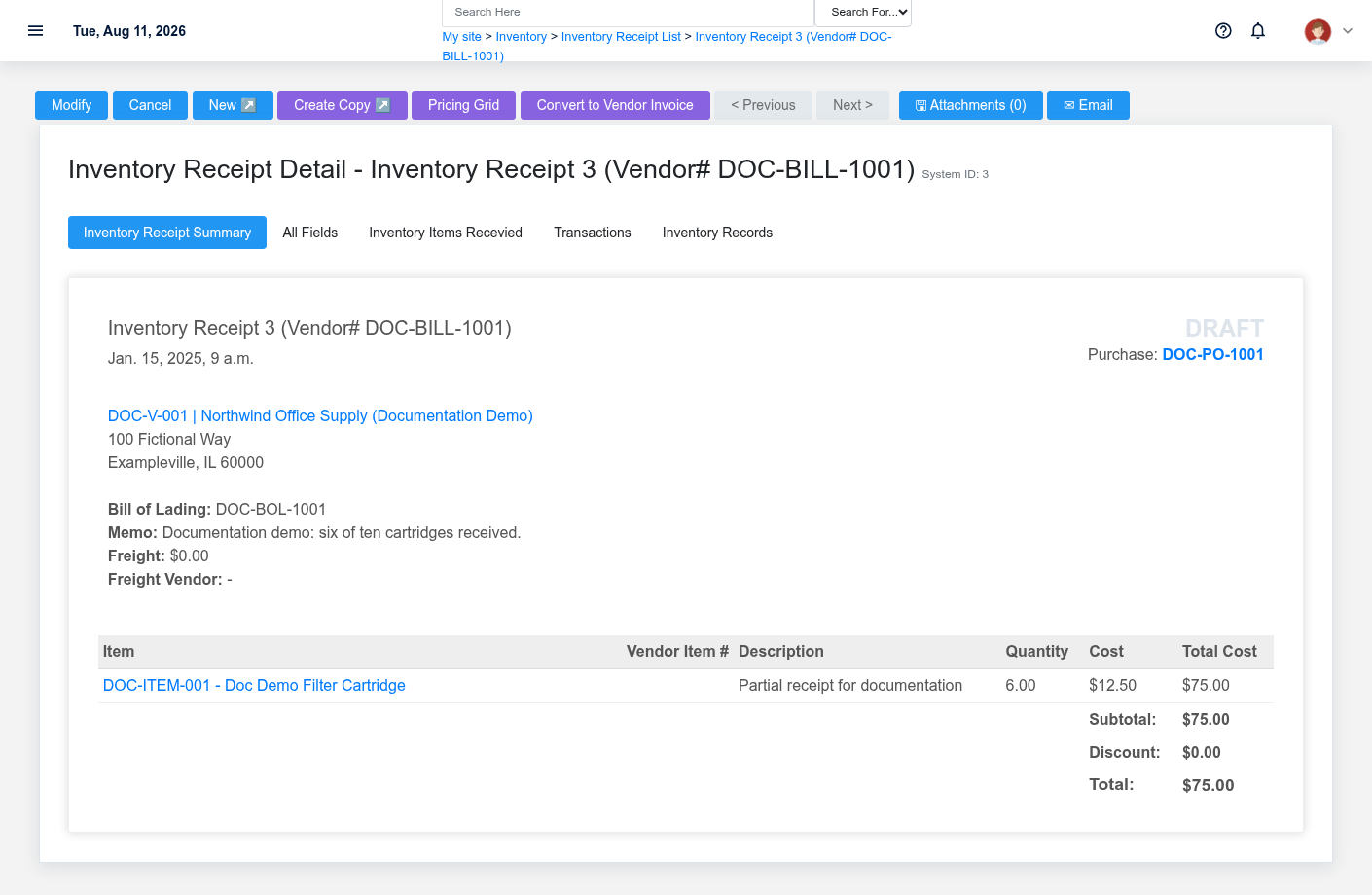
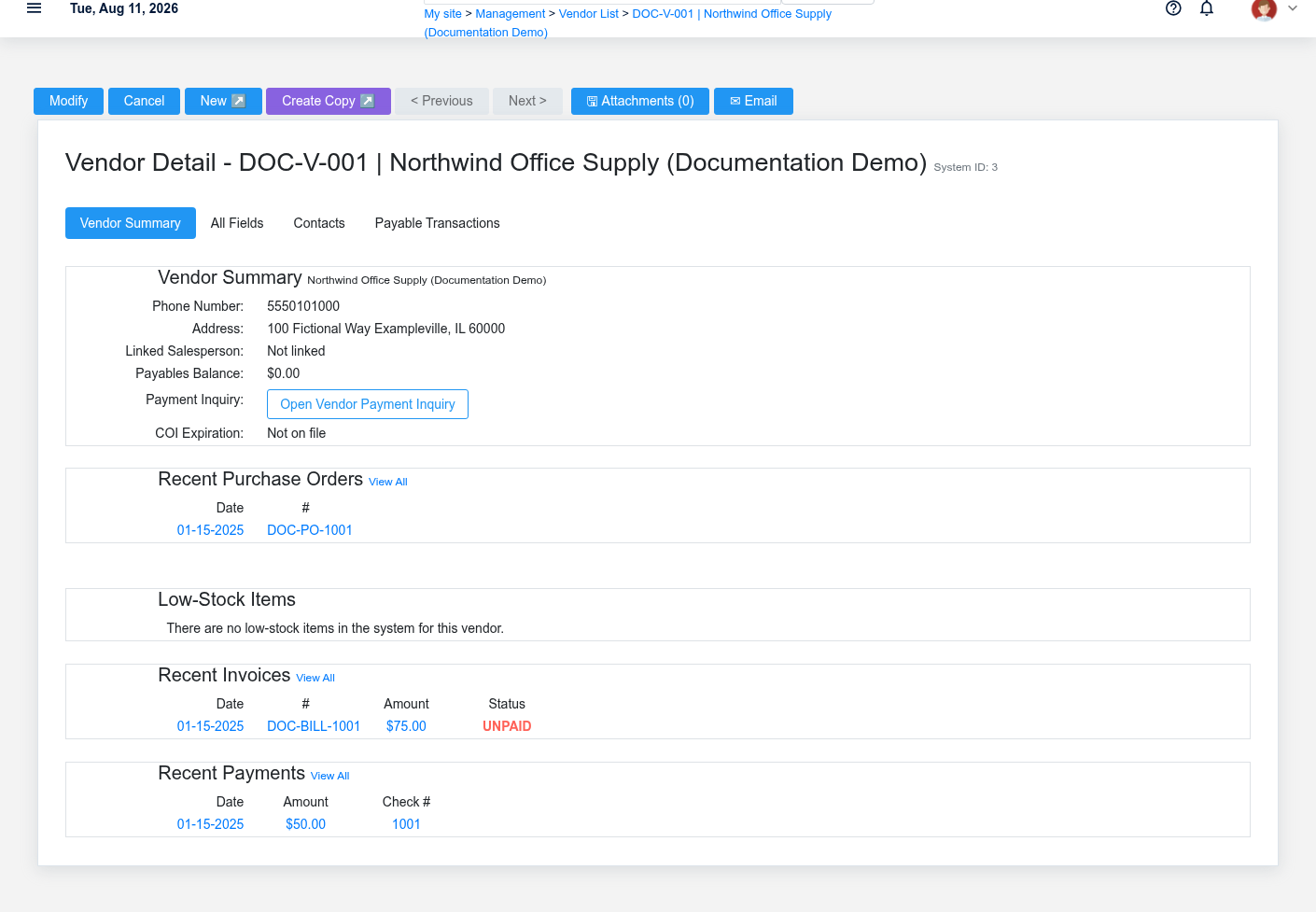
- Receiving clerk — record delivered quantity. Convert the order to an Inventory Receipt. DOC-BILL-1001 records six of ten cartridges. Purchase status becomes Partially Received because the receipt total is below the ordered quantity.
- Receiving/accounting — review receipt costing. Confirm accepted quantity, date, warehouse, BOL, freight, costs, and remaining quantity. Deferred/final-cost processing can require
configuredtheaccrual accounting.3. Recordvendor andreviewvendor invoice number. - Accounts payable — enter the vendor
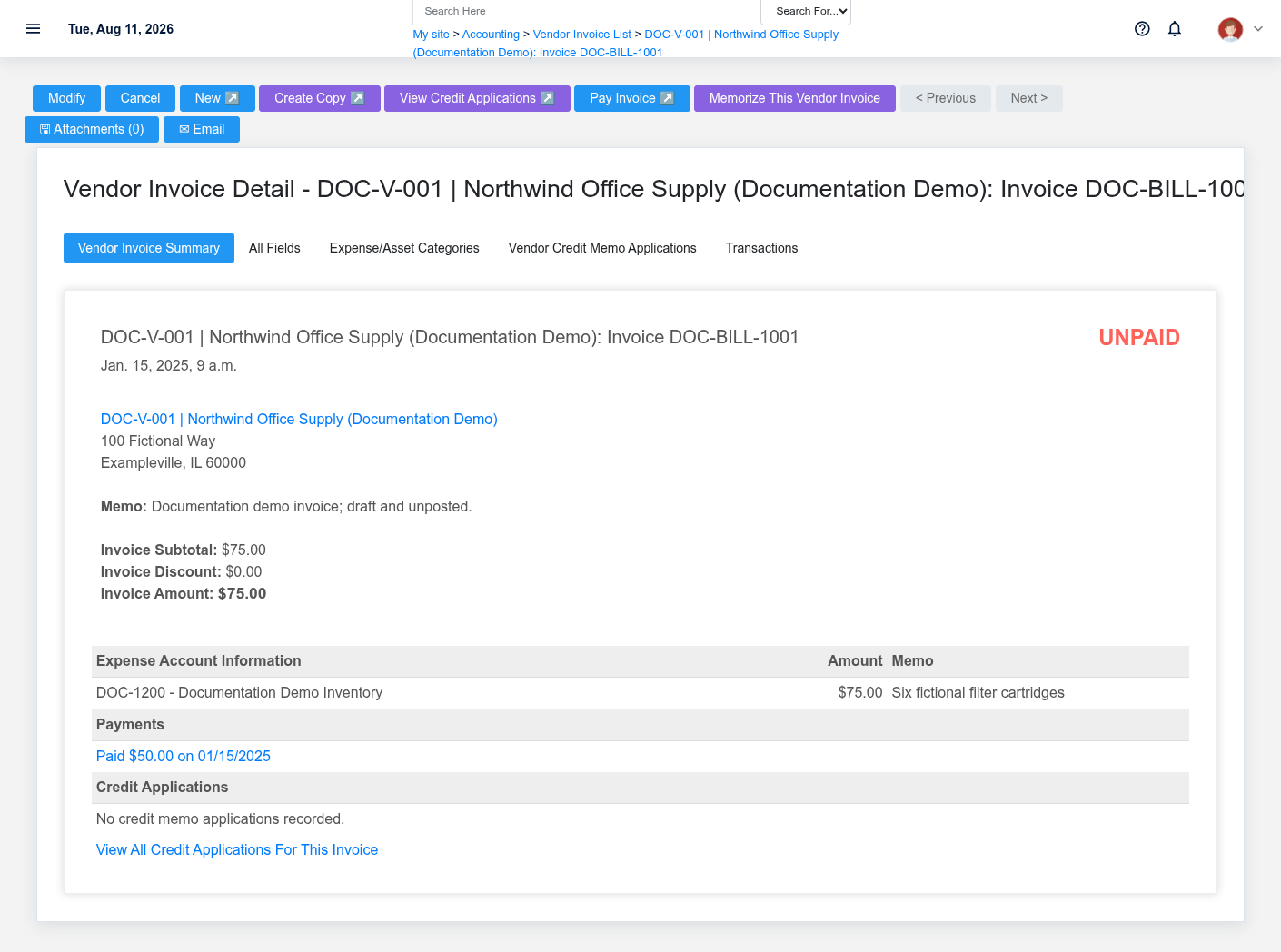
invoiceinvoice.Enter theCreate Vendor Invoice DOC-BILL-1001 from thevendor'svendor document. Verifyvendor, invoice number, invoice andinvoice/due dates, terms,totals,subtotal,and allocation lines. On the detail page, checkamount, receipt links,credits,allocationpayments,accounts, andaccountingpostingtransactionsstate. - Authorized
approvingpayer — record payment.4. Pay the remaining obligationFrom the unpaid invoice, selectUse Pay Invoice tostart acreate Vendor Payment.ConfirmCheck 1001 allocates $50 to thepayment$75 fictional invoice. Confirm account, amount, date,reference/check information,reference, and allocation before posting or issuing anything. - Reviewer — verify the chain. Review Purchase, Receipt, Vendor Invoice, credits, payment applications, accounting transactions, and the remaining open quantity/obligation.
What Brisk keeps connected
| Action | Result or downstream record | Where to verify it |
|---|---|---|
| Submit Purchase | Vendor/warehouse order with item rows | Purchase detail |
| Receive quantity | Receipt rows tied to purchase rows; partial status when incomplete | Receipt and Purchase detail |
| Record Vendor Invoice | Payable document with allocations and |
Vendor Invoice detail |
| Allocate Vendor Payment | Payment-to-invoice link and remaining unpaid amount | Payment and Vendor Invoice detail |
Handoffs and common failure pointscontrols
Purchasingpartial payment retains its invoice allocation while the remaining obligation stays visible.- Wrong draft vendor/item/quantity: correct the Purchase before submission.
ReceivingShortreportsdelivery:quantity,receivefreight,only accepted units andexceptionskeeptothepurchasing/accounting.order Partially Received.AccountingMissingmatchesfreighttheaccountinvoiceortofinal-costtheinputs: correct configuration/evidence before processing.- Duplicate vendor invoice: search vendor and
receipt before payment. A freight validation error can mean the freight accrual preference is missing.A final-cost receipt error can mean vendor or vendorinvoice numberisbeforemissing.creating another.AnWrongunexpectedpostedinvoiceinvoice/payment:due date usually points to invoice date or vendor/payment-term setup.Protected relationships can block deletion; correct throughuse the supportedupdate,credit,credit,void, reversal, orpaymentcorrectedprocessallocation;afterdoreview.not delete material history or create an unrelated opposite record.
The buyer hands an approved order and expected delivery informationexpectation to receiving. Receiving supplies quantity and freight/cost evidence to accounting. Accounts payable matches vendor invoice, receipt, and purchase before payment. Purchase, Receipt, Vendor Invoice, and Payment each remain authoritative for their own business event.